
Shape keys and blend shapes
The process system is new and only in the early access version of Human Generator. It replaces the process tab of version 4.0, which is deprecated. Details can still change; if something doesn't work or looks wrong, let us know.
A Human Generator human carries hundreds of shape keys: the FACS keys of the face rig, the expressions, the body, face and age sliders, and corrective keys that fix the joints when the bones bend. Exporting all of them makes big, slow files, and a game normally only needs the face. Shape Keys decides per group what happens to them, so the face comes through as blend shapes and the body is fixed in the mesh.
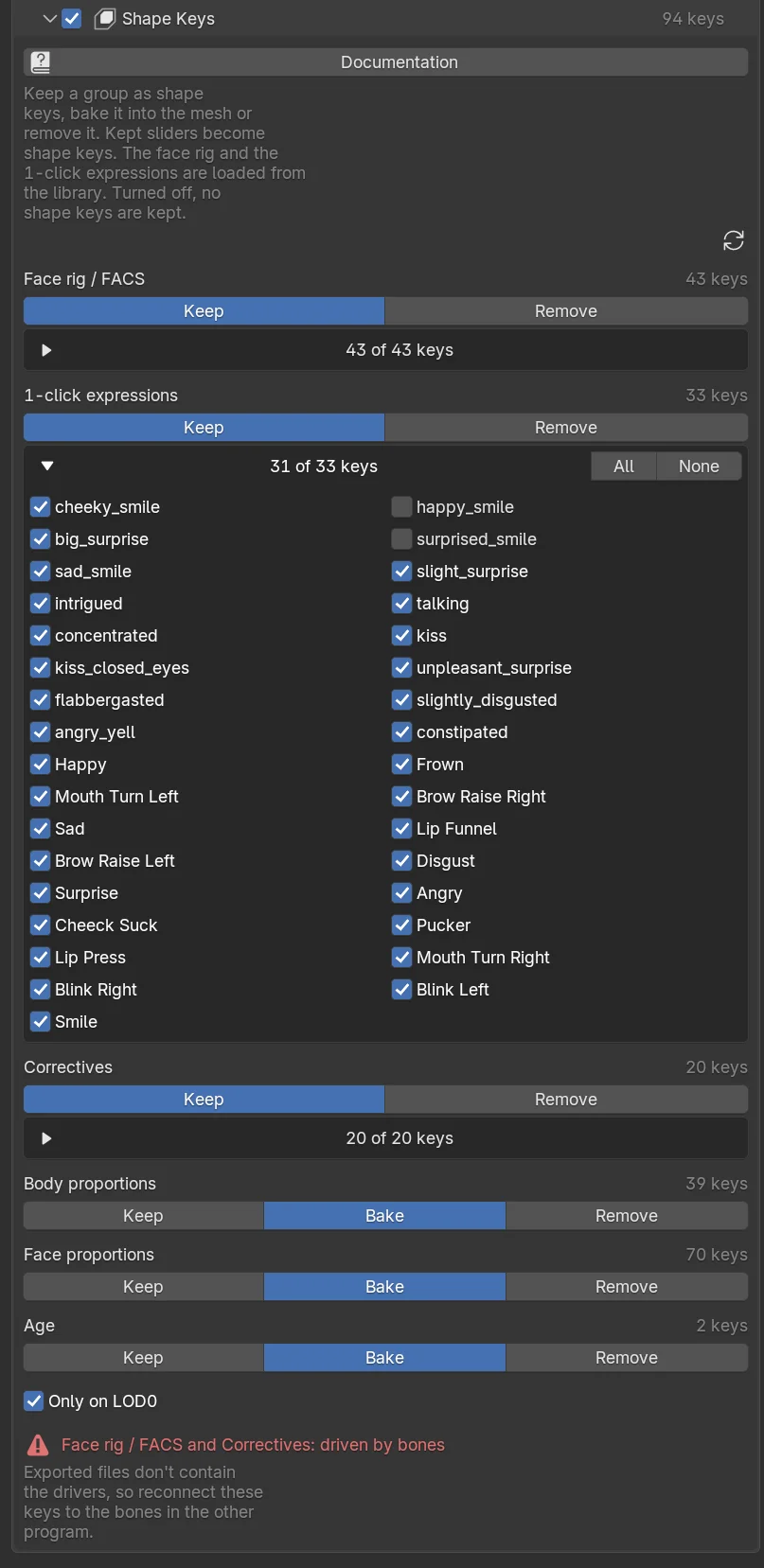
For each group you choose one of:
- Keep: the keys stay on the processed human and end up as blend shapes in the file. Sliders that are live keys in Blender (the body and face sliders, which are not real shape keys until you keep them) are converted to shape keys, so they can be animated in the engine too.
- Bake: the current value of the sliders is applied to the mesh and the keys are removed. The human looks the same, but the sliders are gone.
- Remove: the keys are removed and what they did to the mesh is undone.
The groups
| Group | What it holds | Can be | Default |
|---|---|---|---|
| Face rig / FACS | The FACS shape keys of the face rig, for facial animation and face capture. Loaded from the library when kept, even if the human has no face rig yet. | Keep, Remove | Keep |
| 1-click expressions | The expression presets of the library, as one blend shape each. Loaded from the library when kept. | Keep, Remove | Keep |
| Correctives | Keys driven by the bones that fix the joints and close the eyelids, on the body and the clothing. | Keep, Remove | Keep |
| Body proportions | The body sliders, including the muscle sliders. | Keep, Bake, Remove | Bake |
| Face proportions | The face sliders, the face presets and the eye sliders. | Keep, Bake, Remove | Bake |
| Age | The age sliders. | Keep, Bake, Remove | Bake |
The face rig, the expressions and the correctives can't be baked: the first two are loaded from the library rather than from the human, and the correctives are at rest in the rest pose.
Choosing single keys
A kept group shows a list of its keys, 12 of 54 keys. Open it and untick the keys you don't need; All and None tick the whole list. The refresh icon at the top of the section lists the keys of the selected human again, for example after you added a face rig or a new expression. A recipe that keeps every key of a group applies to any human; one with a selection only keeps those keys.
Only on LOD0
With more than one LOD level, the kept keys are only on the first level. The lower levels get the sliders baked in and the face rig, expressions and correctives removed, as engines generally only blend the closest level.
Keys driven by bones
The face rig and the correctives are driven by bones in Blender: bend the arm and the corrective key goes up by itself. Exported files don't carry drivers, so in the other program these blend shapes are there but static. The section shows a warning when you keep them.
You have three options:
- Drive them in the engine, with a script or a blueprint that sets the blend shape weight from the bone rotation.
- Animate them directly: face capture tools (ARKit and others) set the FACS blend shapes themselves, which is the normal way to use the face rig in a game.
- Remove the correctives, as the Unreal recipe does. The joints deform a bit less nicely, which shows most at the shoulders and elbows up close.
Whether its blend shape names matched the face rig, and what you had to rename. Tell us.
When the section is off
No shape keys are kept: the face rig, the expressions and the correctives are removed, and the sliders are baked at their current values. The lightest possible character, for crowds and props.
Shape keys from Python
settings.shape_keys.face_rig = "keep"
settings.shape_keys.expressions = "remove"
settings.shape_keys.body = "keep"
settings.shape_keys.keep = {"face_rig": ["jawOpen", "eyeBlinkLeft", "eyeBlinkRight"]}
The names you can keep, per group, come from human.process.shape_key_options(). To apply the choice to a human in place (on a human.duplicate()):
human.process.set_shape_keys(body="keep", face="bake", age="remove")See ShapeKeySettings, ProcessSettings › set_shape_keys and ProcessSettings › shape_key_options.
Frequently asked questions
Does the face rig export as blend shapes?
Yes. With Face rig / FACS set to Keep, the FACS shape keys are exported as blend shapes on the body, loaded from the library even if the human has no face rig yet. Face capture tools drive them by name.
Can I keep the body sliders adjustable in the engine?
Set Body proportions to Keep and the sliders become blend shapes you can animate or set at runtime. The default bakes them into the mesh, which keeps the file small.