
Recipes
The process system is new and only in the early access version of Human Generator. It replaces the process tab of version 4.0, which is deprecated. Details can still change; if something doesn't work or looks wrong, let us know.
A recipe is the complete state of the Process tab, saved under a name. Picking one from the Recipe dropdown fills in every option: the output format, the skeleton, how the textures are packed, which shape keys stay. You normally pick the recipe of the program you export to and never touch the rest.
Built-in recipes
The built-in recipes come with the Export pack.
| Recipe | Output | Skeleton | Textures |
|---|---|---|---|
| Unity | FBX, textures in a folder next to it | Humanoid names, T-pose, root bone, meters | Metallic-Smoothness, OpenGL normal map |
| Unreal | FBX with the SK_/M_/T_ prefixes of the Unreal style guide | Mannequin names, A-pose, root bone, centimeters | ORM, DirectX normal map |
| Godot | glTF Binary (.glb) with the textures inside | Humanoid names, T-pose, root bone | Metallic-Roughness, OpenGL normal map |
| Mixamo | FBX, textures in a folder | Mixamo names, T-pose, no root bone | Separate maps, OpenGL normal map |
| Generic game | FBX, textures in a folder | Human Generator names, A-pose, root bone | Separate maps, OpenGL normal map |
| Blender render copy | In this file | Off, the full rig stays | Off, the materials stay as they are |
Every game recipe makes one LOD level at the High quality, converts the hair to high hair cards, keeps the face rig, the 1-click expressions and the corrective shape keys, and bakes the body, face and age sliders into the mesh. Unreal removes the correctives, as they would be static there without extra setup. Blender render copy keeps every mesh and the particle hair as they are.
Each program has its own page with what the recipe does and what to do on the other side: Export to Unity, Export to Unreal Engine, Export to Godot, Export to Mixamo.
Changing a recipe
Change any option and the dropdown shows the recipe as (modified), with two icons next to it:
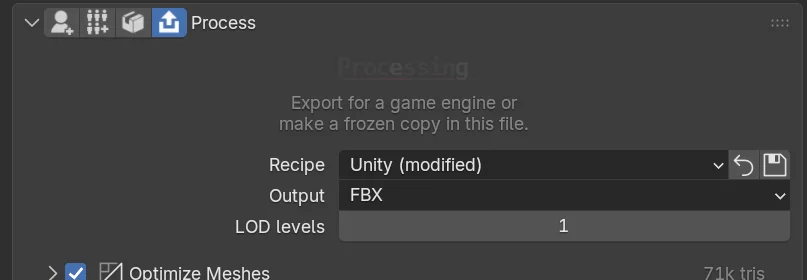
- Reset (the arrow) puts every option back to the recipe.
- Save (the tick) saves your changes as a recipe of your own.
Your changes are kept in the Blender file, so you can close and reopen it without losing them.
Saving your own recipes
Press the save icon, give the recipe a name and choose a group. The groups are the headings of the dropdown; create a new one for a project, or add the recipe to an existing group. A recipe with the same name as an existing one overwrites it; the dialog warns you.
Your recipes are files in the process_templates folder of your Human Generator content folder, one subfolder per group:
<content folder>/process_templates/MyGame/Mobile characters.json
It pays off to save a recipe per use: MyGame hero with 4k textures and three LOD levels, MyGame crowd with 1k textures and the Mobile quality, Preview with 512 textures for quick checks. Switching between them is one click, and every human you export with it gets the same settings.
A recipe is one JSON file. Copy it into the process_templates folder on another computer, or commit it with your project, and it shows up in the dropdown there.
The program you export to and what you changed from the built-in recipe. Tell us.
Inside a recipe file
A recipe is readable JSON with the same structure as the Python ExportSettings. Options that are missing get their default, so a recipe only needs to hold what you care about:
{
    "version": 2,
    "output": {"format": "fbx", "naming": "plain", "textures": "folder"},
    "lods": [
        {"body": "quarter", "clothing": "low", "eyes": "low", "teeth": "low", "haircards": "low", "bones_per_vertex": 4}
    ],
    "skeleton": {"enabled": true, "names": "humanoid", "rest_pose": "t_pose"},
    "textures": {"workflow": "metallic_smoothness", "normal_map": "opengl"}
}
A recipe of your own is listed under its file name. Every option and its values are in the Recipe Format reference.
Recipes saved with the process tab of version 4.0 are converted when they are loaded; options that no longer exist are ignored. A file that can't be read is left out of the list, see Troubleshooting › A recipe is missing from the list.
Recipes from Python
from HumGen3D import ExportSettings

settings = ExportSettings.from_recipe("unity")      # a built-in one
settings = ExportSettings.from_recipe("MyGame/Mobile characters.json")  # one of yours
settings = ExportSettings.from_recipe("/any/path/recipe.json")

settings.textures.set_resolution_tier("1k")
settings.save_recipe("MyGame", "Mobile characters")  # into the content folder
See ExportSettings › from_recipe and ExportSettings › save_recipe.