
Scripts in the process
The process system is new and only in the early access version of Human Generator. It replaces the process tab of version 4.0, which is deprecated. Details can still change; if something doesn't work or looks wrong, let us know.
Scripts runs Python scripts of your own on the processed copy, at the point of the process you choose: right at the start, before the textures are baked, after the skeleton is made, or after the files are written. Anything the other sections don't cover, like adding a prop, setting custom properties your pipeline reads, or writing a sidecar file, becomes a script that runs with every export and is saved in the recipe.
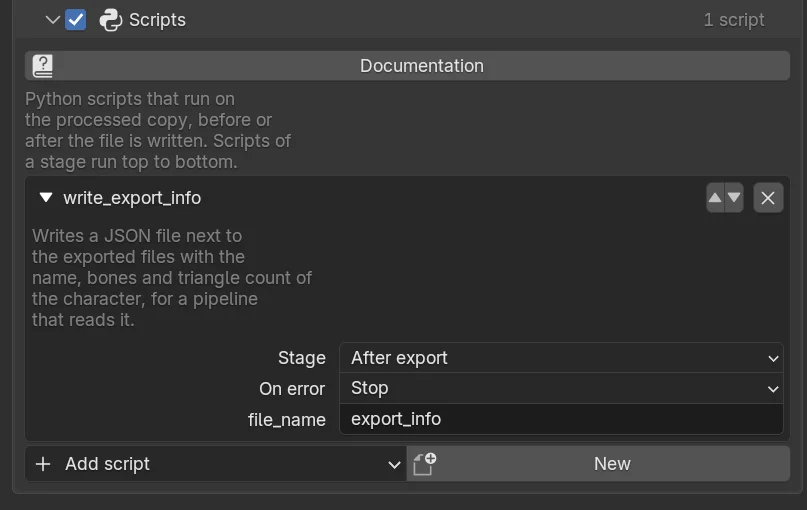
- Add script lists the scripts in the
scriptsfolder of your Human Generator content folder and the ones that ship with the add-on. Adding one turns the section on. - New creates a script from a template in that folder, adds it to the list and opens it in Blender's text editor.
- Each script shows its description, its Stage, what to do On error (Stop the whole process, or Skip the script and carry on with a warning), and its arguments, if it has any.
- The arrows order the scripts; scripts of the same stage run top to bottom. The cross removes a script from the list, not from your computer.
A script is Python code with full access to your computer. Treat scripts from the internet like any other program you download.
Stages
| Stage | Runs | The copy at that point |
|---|---|---|
| Start | on every LOD level | A fresh copy of the human, nothing changed yet |
| Before haircards | on every LOD level | The shape keys are kept, baked or removed |
| Before baking | on every LOD level | Hair cards, game eyes and teeth are made; the materials are still procedural |
| Before mesh optimization | on every LOD level | The textures are baked |
| Before skeleton | on every LOD level | The meshes are reduced |
| After processing | on every LOD level | The level is finished and has its final names (default) |
| Before export | once | One character with every level, right before the file is written |
| After export | once | The files are written; the script gets their paths |
The last two only exist for a file export; with the In this file output the tab warns you that such a script won't run.
Writing a script
A script is a .py file with a main function. The template that New creates looks like this:
"""Describe what the script does here, the interface shows it."""

import bpy
from HumGen3D import Human

# The stage the script is added with
STAGE = "after_processing"


def main(context: bpy.types.Context, human: Human):
    """Runs at the stage chosen in the interface, on every LOD level."""
pass # Your code goes here- The docstring at the top is the description shown in the list.
humanis the Human of the processed copy, never the original, so you can change it freely with the whole Python API.human.objects.rig["hg_export_level"]is the LOD level,0for the first.- The
STAGEconstant sets the stage the script is added with. You can still change it in the list.
Arguments from the interface
Extra parameters of main with a str, int, float or bool annotation become fields in the list, with the default as their initial value:
def main(context, human: Human, prefix: str = "Prop_", strength: float = 1.0, visible: bool = True):
    ...
Scripts after the export
A script at the After export stage can take a files parameter, a list with the paths that were written:
STAGE = "after_export"


def main(context, human: Human, files: list):
    for path in files:
        print("written", path)
An example
The script that ships with the add-on, write_export_info, writes a JSON file next to the exported files with the name, the bones and the triangle count of the character, for a pipeline that reads it. A smaller one that tags the meshes for your engine:
"""Marks every mesh with the name of the character, for the import script of our engine."""

from HumGen3D import Human

STAGE = "after_processing"


def main(context, human: Human, tag: str = "character"):
    for obj in human.objects:
        if obj.type == "MESH":
obj[tag] = human.nameThe error and its traceback are printed to Blender's system console (Window ▸ Toggle System Console on Windows, the terminal on macOS and Linux). With On error set to Skip the failure is listed as a warning in the popup afterwards.
Scripts in a recipe
from HumGen3D import ScriptSettings

settings.scripts.enabled = True
settings.scripts.items.append(
    ScriptSettings(path="/path/to/tag_meshes.py", stage="after_processing", args={"tag": "hero"}, on_error="skip")
)
See ScriptsSettings and ScriptSettings. If you run the process from Python anyway, you can of course also just call your code before or after human.process.run; scripts are for recipes used from the interface.