
Skeleton and bone names
The process system is new and only in the early access version of Human Generator. It replaces the process tab of version 4.0, which is deprecated. Details can still change; if something doesn't work or looks wrong, let us know.
The rig of a Human Generator human is made for animating in Blender: it has control bones, constraints, drivers and a face rig. A game engine wants the opposite, a plain hierarchy of deforming bones with names it recognizes. The Skeleton section makes that skeleton from the rig, with the names and rest pose of Unity, Unreal Engine, Godot or Mixamo, so the engine maps the character to its own skeleton without manual work.
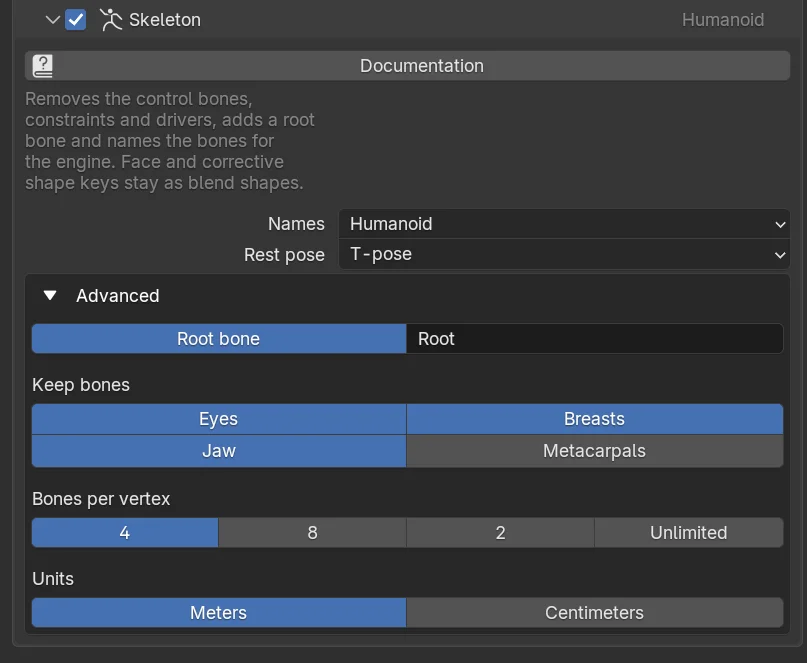
What the section does:
- Control bones, constraints and drivers are removed; what they did to the pose is baked in.
- The weights of bones you don't keep (see below) are merged into their parents, so the mesh still deforms, with small differences at the palm and the shoulders.
- A root bone is added at the origin, which carries the movement of the character.
- The bones are renamed for the engine, the number of bones per vertex is limited, and the rest pose becomes the T-pose when the engine expects it.
- Shape keys driven by bones, like the face rig and the correctives, stay as blend shapes, see Shape Keys.
Names
Which naming the bones get. The recipes pick this for you; the names matter because engines map a skeleton to their own by name.
| Names | For |
|---|---|
| Humanoid | Unity's Humanoid rig and Godot's humanoid skeleton profile, which map the bones by name. |
| Unreal | The bone names of the Unreal Engine Mannequin, for the IK Retargeter and animations made for the Mannequin. |
| Mixamo | The Mixamo skeleton, the skeleton the Mixamo library animations are made for. |
| Human Generator | The original Human Generator names, for any program where you retarget by hand. |
| Custom file | Your own names, from a JSON file. See Custom bone names. |
Rest pose
The pose the skeleton has when no animation plays.
- T-pose: arms straight out. What Unity, Godot, Mixamo and most retargeting tools expect. The body pose of the human is discarded; the face rig keeps its pose.
- A-pose: arms down at an angle, the rest pose of Human Generator itself and of the Unreal Mannequin.
A mismatch shows as arms that are raised or lowered in every animation. Pick what the engine or your animation library expects. The shoulder corrective shape keys only make sense in the A-pose, so they are removed with the T-pose.
Advanced
Root bone
Adds a bone at the origin, above the hips, named Root (Unity, Godot) or root (Unreal) by the recipe. Engines use it for root motion. Mixamo skeletons have none, so that recipe turns it off.
Keep bones
Bones that are not needed for every character. A bone you don't keep is removed and its weights go to its parent, so the mesh still deforms.
- Eyes: the two eye bones. Off, the eyes are fixed in the head and follow it.
- Jaw: the jaw bones that open the mouth and move the lower teeth. Keep them for lip sync by bones; the face rig blend shapes open the mouth too.
- Breasts: the breast bones, for physics or secondary animation.
- Metacarpals: the palm bones between the hand and the fingers. Most engine skeletons don't have them, so they are off by default; their weights go to the hand.
Bones per vertex
How many bones may deform one vertex. 4 is the default of Unity and Unreal. 8 keeps more of the shoulder and hip weights but needs the higher limit enabled in the engine. 2 for mobile and VR, where engines often clamp to two bones. Unlimited keeps every weight and lets the engine decide. With several LOD levels each level has its own limit.
Units
FBX only. Meters are what Blender, Unity, Godot and Mixamo use. Centimeters are Unreal's units; the recipe sets them so the character imports at scale 1 instead of 0.01.
Which bones you kept, the bones per vertex, and where the mesh deforms differently from Blender. Tell us.
Rigify humans
A human with a Rigify rig has no Human Generator rig to make the skeleton from, so the section is skipped and the Rigify rig is exported as it is. Everything else in the process works normally.
Custom bone names
For a program that is not covered, set Names to Custom file and point File to a JSON file. It maps the Human Generator bone names to the names you want, and tells how the left and right sides are written:
{
    "sides": {
        "L": {"side": "l", "Side": "Left", "suffix": "_l"},
        "R": {"side": "r", "Side": "Right", "suffix": "_r"}
    },
    "names": {
        "spine": "pelvis",
        "spine.001": "spine_01",
        "neck": "neck_01",
        "head": "head",
        "upper_arm": "upperarm_{side}",
        "forearm": "lowerarm_{side}",
        "hand": "hand_{side}"
    }
}
The keys of names are the Human Generator bone names without their .L/.R side suffix. A name can hold {side}, {Side} or {suffix}, which are filled in from sides for the left and right bone: upperarm_{side} gives upperarm_l and upperarm_r, {Side}UpperArm gives LeftUpperArm. Only names is required; bones you leave out keep their name. The built-in presets are in process/game_rig_presets.json in your Human Generator content folder, installed by the Export pack, and list every bone; copy one as a starting point.
In Blender the face rig and the corrective shape keys are driven by bones. Exported files don't carry drivers, so in the other program those blend shapes exist but don't move with the bones until you connect them there, or drive them from your own animation. See Shape Keys › Keys driven by bones.
Skeleton from Python
settings.skeleton.names = "unreal"      # "humanoid", "unreal", "mixamo", "humgen", "custom"
settings.skeleton.rest_pose = "a_pose"  # or "t_pose"
settings.skeleton.keep_metacarpals = True
settings.lods[0].bones_per_vertex = 8
To convert a human in place (on a human.duplicate(), it can't be undone):
human.process.convert_to_game_rig(names="humanoid")  # keeps the rest pose; call set_t_pose_as_rest first for a T-pose
human.process.convert_to_game_rig(settings=settings.skeleton, max_influences=4)
See SkeletonSettings, ProcessSettings › convert_to_game_rig and ProcessSettings › set_t_pose_as_rest.
Frequently asked questions
Does the exported character work with Unity's Humanoid rig?
Yes. The Unity recipe names the bones for the Humanoid avatar and exports a T-pose, so Create From This Model maps all Humanoid bones by name. The same names serve Godot's humanoid skeleton profile.
Can I retarget Unreal Mannequin animations to it?
The Unreal recipe gives the skeleton the Mannequin bone names and the A-pose, in centimeters, so the chains line up in the IK Retargeter.
Can I use Mixamo animations?
Export with the Mixamo recipe and the skeleton has the Mixamo bone names and the T-pose the library animations are made for. Upload the character to Mixamo, or download the animations without skin and play them on the character in your engine. See Export to Mixamo.