
Body
Part of the Human Generator Guide
The body panel
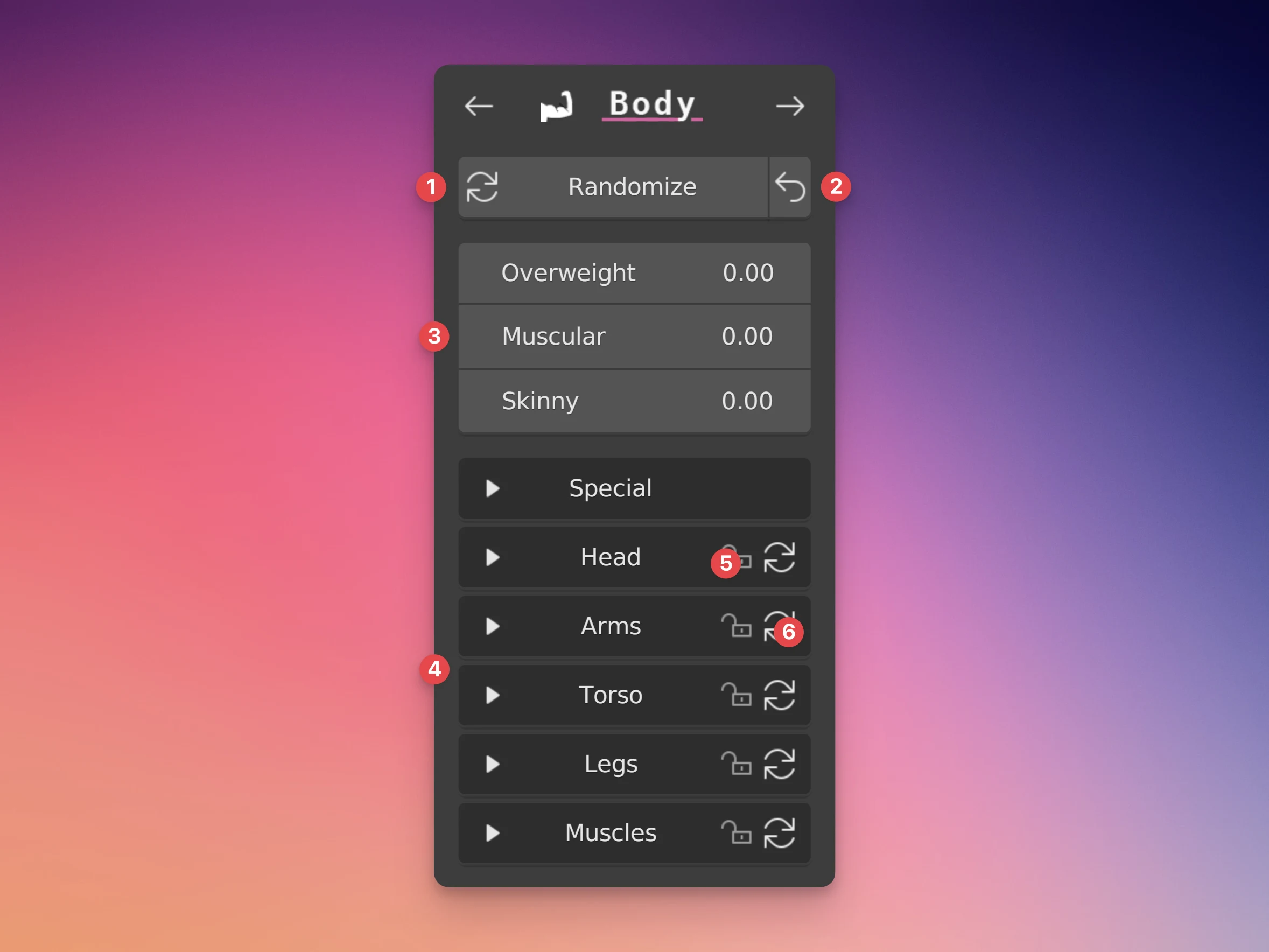
- The randomize button will pick random values for both the full-body sliders and the specific sliders.
- Reset button: This resets all sliders to their original 0.0 value.
- Full-body sliders: These sliders quickly change the proportions of all parts of the body at once.
- Specific sliders: These sliders only change very specific parts of the body for more detailed adjustment.
- Randomization lock: Want to randomize the whole body, but keep some specific adjustments locked? Enabling this lock will prevent randomization of all sliders in this category.
- Randomize category button: This will randomize only the sliders within this category. Note: The randomize button at the top only does small adjustments on the specific sliders (a standard deviation of 0.1) but the randomize category button does bigger adjustments (a standard deviation of 0.5).
Randomization
The randomize buttons for both all sliders and for the specific categories do NOT randomize the sliders in the "Special" category and any slider with "length" in it's name.
Slider limits
Want a stronger adjustment than possible with the slider? You can click and manually type in a value between -10.0 and +10.0 to go outside the slider limits.
Making custom body sliders
Want to add your own sliders? Did you make shape keys and want to use them on other humans too? See Custom shape keys.